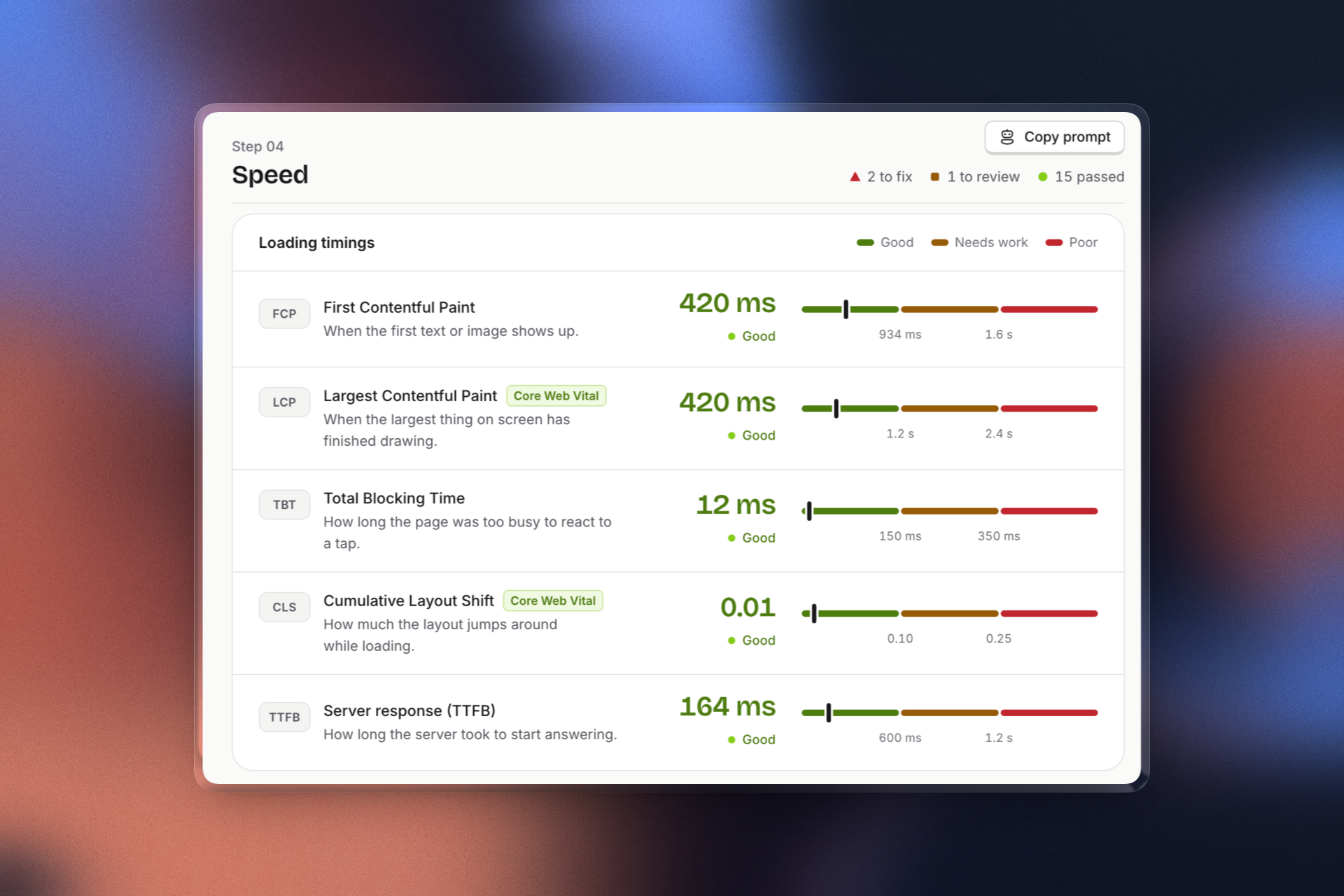
Ask ten SEO people about Core Web Vitals and you'll get ten answers. Some say a slow page will sink your rankings. Others say Google doesn't care about speed at all.
Both are wrong.
Core Web Vitals are a real ranking signal. But they won't push a weak page to the top. The truth is in the middle. Once you see where, you can skip the wrong fixes and focus on the ones that help both your rankings and your sales.
This guide explains what Core Web Vitals are, how Google uses them, the scores you need, and what to fix first.
Want to check your page right now? Run a free scan on Mozolite. You'll get your speed numbers and a list of fixes, ranked by how much they matter for search.
What Are Core Web Vitals?
Core Web Vitals are three numbers. Google uses them to measure how a page feels to a real visitor.
| Metric | What it checks | Good | Needs work | Poor |
|---|---|---|---|---|
| LCP (Largest Contentful Paint) | How fast the main content shows up | 2.5 s or less | 2.5 – 4 s | Over 4 s |
| INP (Interaction to Next Paint) | How fast the page reacts when you click or tap | 200 ms or less | 200 – 500 ms | Over 500 ms |
| CLS (Cumulative Layout Shift) | How much the page jumps around while it loads | 0.1 or less | 0.1 – 0.25 | Over 0.25 |
Source: Web Vitals on web.dev
Two details matter more than most people think.
1. Google looks at 75% of your visits. To pass, at least 3 out of 4 real visits need a "Good" score. Google explains why in how the Core Web Vitals thresholds were set. Your page may feel fast on your laptop. But if a quarter of your visitors use cheap phones on slow mobile data, you can still fail.
2. INP replaced FID in March 2024. The old metric, FID, only timed the first click. INP looks at every click and tap during the visit, so it's much harder to pass. Read the official announcement for details. If a checklist still talks about FID, it's out of date.
Do Core Web Vitals Really Affect Rankings?
Yes. Google says so in its own docs. Its guide to page experience in Google Search states that Core Web Vitals are used by its ranking systems.
But the same guide adds a catch. Good scores don't promise top rankings. Google still wants to show the most useful page, even if that page is a bit slow.
Here's what that means in practice.
1. They break ties
Imagine two pages that are equally useful and equally trusted. Speed and stability can decide which one ranks higher. On busy search terms, where the whole first page is good, this happens a lot.
2. Useful content always comes first
A slow page that answers the question well will usually beat a fast page that doesn't. No amount of image compression will save thin content.
3. Bad scores can hold good pages back
The flip side is also true. If your content is great but your pages are slow or jumpy, you leave rankings on the table. This hurts most when rivals have content just as good as yours.
4. Google scores pages, not whole sites
Google checks each page, or groups of similar pages when there isn't enough traffic. One slow blog template can drag down every post that uses it, while your fast homepage does fine.
For the full picture, see Google's guide to Core Web Vitals and search results.
Lab Tests vs. Real Users: What Google Actually Uses
This is the most common mix-up.
There are two kinds of speed data:
Lab data comes from a test run on one device, at one moment. Tools like Lighthouse and Mozolite work this way. Lab data is great for finding why a page is slow.
Field data comes from real Chrome users over the past 28 days. Google collects it in the Chrome UX Report (CrUX). This is what Google uses for ranking.
Why does this matter?
A perfect lab score doesn't mean you pass. Real people have slower phones and worse internet. They also click things a lab test never touches.
Fixes take a few weeks to show up. Field data covers the last 28 days. A fix you ship today will show up slowly over the next month.
New sites may have no field data yet. If too few people visit, Google has nothing to grade. Focus on content and links first. Build good speed habits now so you pass when traffic arrives.
The best workflow: use both
Find problems with field data. Open the Core Web Vitals report in Google Search Console. It shows which groups of pages fail, on mobile and desktop.
Find the cause with a lab test. Scan a failing page with Mozolite. It loads the page in real Chrome with mobile throttling. Then it measures LCP, CLS, TTFB and Total Blocking Time (TBT). It also flags render-blocking files, unused JavaScript, heavy pages, old image formats and lazy-loading mistakes.
Fix, then check again. Rescan to confirm the fix works in the lab. Then watch Search Console as the field data updates.
Note on INP: Lab tools can't measure INP well, because a lab test doesn't click around like a person does. Total Blocking Time (TBT) is the best lab stand-in. A high TBT almost always means a poor INP.
Other useful free tools:
PageSpeed Insights shows real-user data (when Google has it) next to a lab test.
The web-vitals JavaScript library lets you collect LCP, INP and CLS from your own visitors.
Mozolite vs. Lighthouse explains how the two tools differ.
Why Speed Matters Beyond Rankings
Even if Google ignored Core Web Vitals, they'd still be worth fixing. Slow, jumpy pages hurt the things that pay the bills:
More people leave when the main content takes too long to appear.
Fewer people buy when buttons feel stuck, or the page shifts just as they tap "Buy".
Ad and affiliate income drops when visitors leave before the page finishes loading.
There are real examples. After Vodafone sped up its LCP by 31%, it saw 8% more sales.
Think of it this way: Core Web Vitals are a visitor problem first and an SEO problem second. Fix them for your visitors, and the ranking boost comes along for free.
How to Fix Each Core Web Vital
Fixing LCP (loading)
The LCP element is usually a big hero image, a large heading or the featured image at the top.
Find your LCP element first. Don't guess. A Mozolite scan, PageSpeed Insights or the Chrome DevTools Performance panel will show you which element it is.
Don't lazy-load the hero image. Putting
loading="lazy"on your top image is one of the most common LCP mistakes.Tell the browser it's important. Add
fetchpriority="high"to the LCP image. Preload it if the browser finds it late, for example when it's a CSS background.Use modern, right-sized images. Serve AVIF or WebP. Use
srcsetso phones don't download a huge desktop image.Speed up your server. Use caching, a CDN and static pages where you can. A slow server (high TTFB) delays everything after it.
Remove files that block the page. Inline your critical CSS. Defer JavaScript you don't need right away. Don't make the page wait for big font files.
More tips: Optimize LCP on web.dev.
Fixing INP (response to clicks)
A poor INP almost always means the browser is busy when the user tries to click.
Ship less JavaScript. Every file has to be downloaded and run. Remove code you don't use.
Break up long tasks. Any task over 50 ms blocks clicks. Split heavy work into small pieces, so the browser can respond in between.
Check third-party scripts. Chat widgets, tag managers, A/B tests, heatmaps and ad scripts often cause poor INP. Load them later, load them only where needed, or remove the ones nobody uses.
Watch out for heavy frameworks. In React, Next.js and similar tools, large client-side parts can freeze the page right when people start clicking. Render as much as you can on the server.
Show feedback right away. Update the screen the moment someone clicks, with a pressed button or a spinner. Do the heavy work after that.
More tips: Optimize INP on web.dev.
Fixing CLS (jumping layout)
The layout jumps when something changes size or moves after the page starts to show.
Give images and videos a size. Set
widthandheight, or use CSSaspect-ratio. The browser can then save space before they load.Save space for ads and embeds. Give ad slots and iframes a fixed minimum height, so they don't push content down.
Don't push content down from the top. Cookie banners and promo bars should float over the page, or have space saved for them.
Load fonts with care. Use
font-display: swaporoptional, with a backup font of a similar size. This keeps text from jumping when the custom font arrives.Animate the right way. Use
transformandopacity. Avoid animatingtop,heightormargin, which move the layout.
More tips: Optimize CLS on web.dev.
What to Fix First
Not sure where to start? This order gives you the most value for your time:
Check Search Console. Find out if you have a problem, on which device, and on which pages.
Fix templates first. One fix to a shared blog or product template can help hundreds of pages at once.
Start with the worst mobile score. Most sites struggle most on mobile, and that's where most traffic comes from.
Grab the easy wins. Hero images, missing image sizes and scripts you don't need.
Test, then wait. Rescan with Mozolite to confirm the fix. Then click "Validate fix" in Search Console, and give it a few weeks.
Keep checking. Speed gets worse quietly. A new plugin, tracking script or redesign can undo months of work. Scan key pages after every big change.
Common Myths About Core Web Vitals
"A perfect Lighthouse score will boost my rankings." Google ranks on real-user data, not lab scores. Lab tools help you find problems. They aren't what Google grades.
"If I pass Core Web Vitals, I'll jump to page one." Passing removes a weak spot. It doesn't replace useful content or trust.
"Core Web Vitals don't matter, so I can ignore speed." They are a real signal. They can decide close races, and they affect how many people stay and buy.
"Desktop scores are what count." Google reports mobile and desktop on their own. Mobile is usually harder to pass, so don't only test on a fast laptop.
"I just need to fix FID." FID was replaced by INP in March 2024. Focus on INP.
Key Takeaways
Core Web Vitals (LCP, INP, CLS) are a real Google ranking signal, but just one of many.
Useful content always comes first. Core Web Vitals help most as a tie-breaker between similar pages.
Google ranks on real-user data from the last 28 days, not lab scores.
Aim for LCP of 2.5 s or less, INP of 200 ms or less and CLS of 0.1 or less, on mobile, for at least 3 out of 4 visits.
Use Search Console to see what fails, and a lab tool like Mozolite to find out why.
Faster, steadier pages mean fewer people leaving and more sales. That's the best reason to fix them.
FAQ
Are Core Web Vitals a big ranking factor?
They are a real but fairly small signal. Useful content and relevance matter far more. Core Web Vitals count most when the competing pages are otherwise alike.
How long until Google sees my fixes?
Google's real-user data covers the last 28 days. Expect your fixes to show up in Search Console over about four weeks.
Why does my lab test look good, but Search Console says I fail?
A lab test runs once, on one simulated device. Search Console uses data from real visitors, including those on slow phones and networks. The real-user data is what counts for rankings.
My site is new and has no Core Web Vitals data. Is that a problem?
Not really. Without enough visitors, Google has no field data to grade. Focus on content and getting found. Use a lab tool to keep your pages fast, so you pass once the data arrives.
Should I focus on mobile or desktop?
Mobile. It's usually harder to pass, and most sites get most of their search traffic from phones.
How can I check my Core Web Vitals for free?
Use Google Search Console and PageSpeed Insights for real-user data. Then scan your page on Mozolite to get a ranked list of fixes. Your first full report is free.
Further Reading
Web Vitals overview on web.dev
Understanding Core Web Vitals and Google search results on Google Search Central
Understanding page experience in Google Search on Google Search Central
Chrome UX Report (CrUX) documentation on Chrome for Developers
INP becomes a Core Web Vital on web.dev
Free SEO tools on Mozolite: meta tags, robots.txt, security headers, redirects and AI crawler checks
