People now ask ChatGPT, Claude, Gemini and Copilot the questions they used to type into Google. These tools read the web, pick a few sources, and cite them. You want to be one of those sources.
The good news: you don't need a new playbook. Google says its AI features run on the same crawl, index and ranking systems as classic Search. It also says you don't need special AI files or AI-only content to show up. So most of this list is good SEO, done with care.
Use this checklist page by page. Tick each box before you publish.
1. Let AI crawlers in
If a bot can't reach your page, nothing else matters.
Allow the AI search bots in robots.txt. The main ones are
OAI-SearchBot(ChatGPT search),Claude-SearchBotandClaude-User(Claude),Googlebot(AI Overviews and AI Mode) andBingbot(Copilot).Decide on training bots on purpose.
GPTBotandClaudeBotcollect data for model training. Blocking them is a valid choice. It is separate from search access.Check your CDN and firewall. Bot protection often blocks AI crawlers even when robots.txt allows them. Look for
403and429errors in your logs.Keep your sitemap fresh. List every page you want found, with real
lastmoddates.Ping changes with IndexNow. Bing uses it to pick up new and updated pages fast.
A simple robots.txt that welcomes AI search:
User-agent: OAI-SearchBot
Allow: /

User-agent: Claude-SearchBot
Allow: /

User-agent: Claude-User
Allow: /

Sitemap: https://example.com/sitemap.xml
Note: User-triggered fetchers like
ChatGPT-Usermay not follow robots.txt at all, since a person asked for the page. Don't rely on robots.txt alone to block them.
2. Make the page easy to read
AI tools pull short passages, not whole pages. Each passage should make sense on its own.
Put the answer first. Answer the main question in the first two or three sentences. Add detail after.
Use one clear H1 and logical H2s. Write headings as the questions people ask.
Keep sentences short. Aim for 15–20 words. Use plain words. Aim for a Flesch Reading Ease score of 60 or higher.
Keep paragraphs short. Two to four sentences each. One idea per paragraph.
Use lists and tables for steps, specs and comparisons. They are easy to quote.
Put key content in HTML text. Don't hide it in images, tabs that need clicks, or JavaScript that loads late. Add alt text to images.
3. Say something worth citing
AI answers already know the basics. They cite pages that add something new.
Add original facts. Your own data, tests, screenshots, prices or examples. Google calls this "non-commodity" content.
Be specific. Give numbers, dates, names and steps. "Loads in 1.2 s on 4G" beats "loads fast".
Define terms in one line. A clean "X is…" sentence is easy for a model to lift.
Add a short FAQ for the follow-up questions people really ask.
Don't mass-produce pages. Google treats scaled, low-value content made to rank as spam. Fewer, better pages win.
4. Show who you are
Models favor sources that look real and trusted.
Name the author and link to a short bio with real experience.
Show dates. Add "published" and "updated" dates, and update them only when content changes.
Cite your sources. Link out to official docs and data.
Keep brand facts the same everywhere. Same name, description and links on your site, social profiles and directories.
Earn mentions. Reviews, guest posts and community answers help models learn your brand exists.
5. Add structure for machines
Add schema markup with JSON-LD:
Organization,Article,FAQPage,ProductorSoftwareApplication, andBreadcrumbList. Make sure it matches what's on the page.Link related pages together. Good internal links help bots find and understand your topics.
Consider an
llms.txtfile. It's a short Markdown map of your best pages. It's optional and not confirmed as a ranking signal by any major AI provider, but it costs little and Lighthouse now checks for it.
6. Keep the page fast and clean
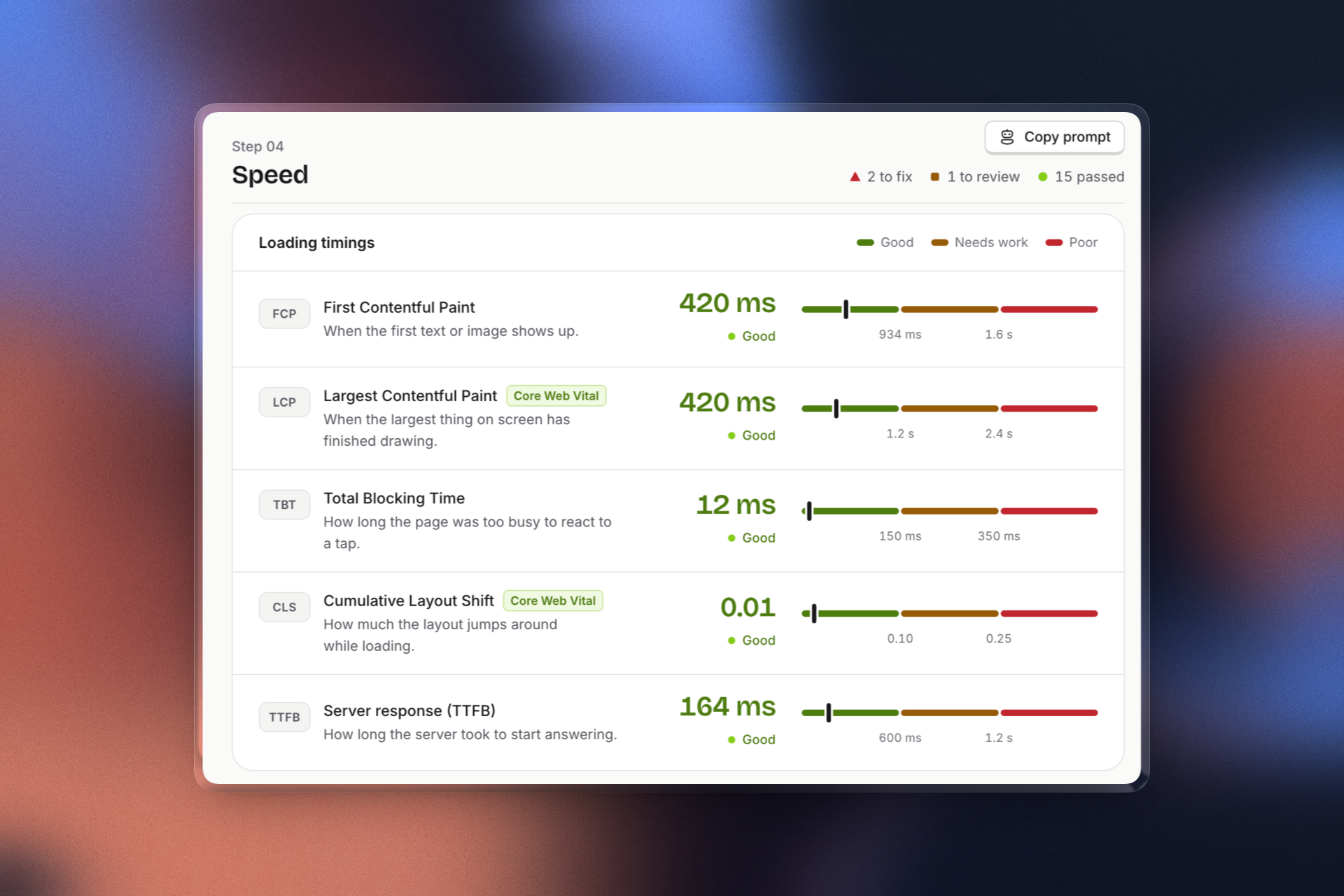
Pass Core Web Vitals. Good LCP, INP and CLS help both people and bots.
Use HTTPS and sane security headers.
Avoid intrusive pop-ups that cover the main content.
Return the right status codes. No soft 404s, no redirect chains.
7. Measure and repeat
Check Google Search Console. It now has generative AI performance reports for AI Overviews and AI Mode.
Check Bing Webmaster Tools → AI Performance. It shows how often Copilot and Bing AI summaries cite your pages, and for which queries.
Test real prompts. Ask ChatGPT, Claude, Gemini and Perplexity the questions your buyers ask. Note who gets cited, and why.
Watch AI bot hits in your server logs. No visits means an access problem.
Refresh your top pages every few months with new facts and dates.
Quick scan before you publish
| Check | Pass? |
|---|---|
| AI search bots allowed in robots.txt and CDN | ☐ |
| Answer in the first 2–3 sentences | ☐ |
| Headings written as questions | ☐ |
| Flesch score 60+ | ☐ |
| At least one original fact, number or example | ☐ |
| Author, dates and sources shown | ☐ |
| Schema matches the visible content | ☐ |
| Core Web Vitals pass | ☐ |
Want to skip the manual work? Run your page through Mozolite. It shows how search engines and AI assistants read your page, ranks issues by impact, and tells you how to fix them in plain words. Try the free robots.txt tester to confirm AI bots can get in.
Resources
Official guides
Optimizing your website for generative AI features on Google Search — Google
AI features and your website — Google Search Central
Introduction to structured data — Google
AI crawlers
Overview of OpenAI crawlers — OpenAI
Anthropic's bots and robots.txt controls — Anthropic
Tools and standards
AI Performance in Bing Webmaster Tools — Microsoft Bing
Google Search generative AI control — Search Console Help
Lighthouse llms.txt audit — Chrome for Developers